Android Auto has gained popularity as users seek ways to enhance their in-car experience. Many individuals are particularly interested in hacks that allow them to watch popular streaming services like Netflix and YouTube while using Android Auto. The demand for these modifications stems from a perceived limitation in Android Auto’s customization options, which users find less flexible than other Android applications.
Fortunately, there are effective methods available for those looking to personalize their Android Auto setup. From accessing additional applications to enjoying favorite shows on the road, users now have opportunities to tailor their experience. This article explores various hacks and tricks to fully utilize Android Auto, ensuring a more satisfying and enjoyable driving experience.

WheelPal App
For those looking to enhance their Android Auto experience, the WheelPal app offers excellent customization options. This app allows users to enable and access popular applications like YouTube and Netflix directly through their car’s infotainment system. WheelPal simplifies the process of utilizing apps that are not typically allowed by default.
Key Features:
- Access to Favorite Apps: Enjoy streaming services while on the go.
- User-Friendly: Easy installation and straightforward functionality.
- Compatible: Works seamlessly with most Android Auto systems.
With WheelPal, drivers can transform their car into a mobile entertainment hub.
Android Auto Hacks and Tips
Installing Android Auto can be simple, even if it’s not officially supported in a user’s country. Here’s how to do it using a VPN:
- Select a VPN: Download a VPN application that works with the phone.
- Choose a Server: Connect to a server located in a country that supports Android Auto.
- Connect the VPN: Establish the VPN connection to access the Play Store.
- Access Settings: Navigate to Settings and select Apps.
- Google Play Store: Find the Google Play Store in the App List, then tap on it.
- Clear Data: Press “Clear Data” and “Force Stop” to reset the app.
- Relaunch Play Store: Exit the settings and reopen the Play Store app.
Once these steps are completed, installing Android Auto will be possible, allowing access to its many features. This method opens up Android Auto’s capabilities, enhancing the driving experience with connectivity and convenience.
Android Auto Compatibility Checker
To determine if a car model is compatible with Android Auto, individuals can refer to the list of vehicles that support the platform or use the Carmine compatibility checker app developed by CarPlayHacks. Users simply input the car’s make, model, and year of manufacture. The app will then indicate whether the car is compatible with Android Auto and Apple CarPlay. Additional resources for Android Auto can be found in the Apps and Downloads section for further assistance.
2. YouTube Hack for Android Auto
Driving demands full attention, which is why many engaging apps, especially those for gaming and video streaming, are not part of the Android Auto app selection. Yet, the desire to have YouTube available in this environment is strong among car users.
YouTube’s popularity has surged, making it a key app for many people. Unfortunately, video apps often distract drivers, leading to restrictions on their inclusion in Android Auto. However, having YouTube can be beneficial, particularly for passengers who want to watch content during rides.
For those who want to enjoy YouTube while maintaining focus on driving, there are methods to integrate it into Android Auto. If drivers feel they can safely listen to videos, they may follow specific steps to install YouTube through the YouTube hack for Android Auto. This option allows a balance between entertainment and safety on the road.
3. How to Convert a Wired Android Auto Head Unit to Wireless (No Root Necessary)
Wireless Android Auto Adapter
Wireless Android Auto adapters can upgrade the driving experience by enabling a wireless connection for those with a wired Android Auto setup. This innovation not only facilitates app use but also allows streaming services like Netflix directly on the car’s infotainment system. As the demand for upgraded car technology grows, these wireless adapters are becoming quite popular among drivers.
Popular Adapters
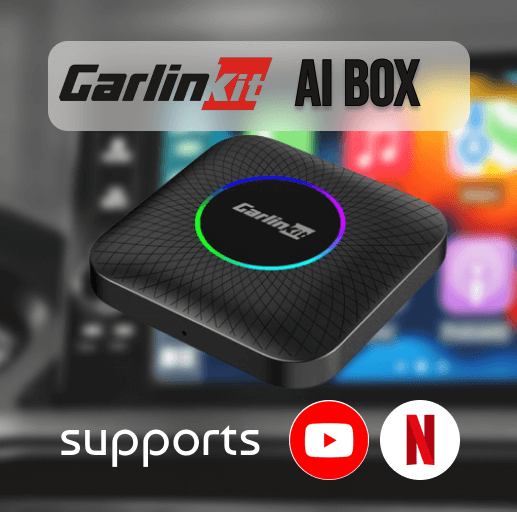
Here are some notable options that many Android Auto users have recently favored:
- Carlinkit Wireless CarPlay AI Box 2024
- Overview: This adapter is designed to provide the latest wireless features for both CarPlay and Android Auto, enhancing the user experience by allowing third-party apps to run.
- Compatibility: Works with iOS and Android devices including iPhone 6 and newer (iOS 10.0 or higher), as well as Android phones with Android 11.0 or above. Newer iPhone 16 series and iOS 18 are also supported.
- Requirements: Must be compatible with vehicles that have built-in CarPlay and Android Auto.
- Features:
- Supports both CarPlay and Android Auto.
- Responsive controls via knobs and buttons.
- Can access various apps, including YouTube, Netflix, and Disney+.
- Comes with 4GB RAM and 64GB ROM.
- Ottocast AI Box Wireless CarPlay Adapter
- Overview: Known for its reliability, this brand offers an affordable solution for wireless connectivity in vehicles equipped with Android Auto or CarPlay.
- Compatibility: Supports iOS and Android devices.
- Compatible Cars: Works with vehicles from 2016 to 2024.
- Requirements: Compatible with vehicles equipped with built-in CarPlay and Android Auto.
- Features:
- Offers fast and reliable connections.
- Works across multiple platforms.
- Includes a USB cable for easy setup.
- Allows streaming from platforms like YouTube and Netflix.
- Simple installation process, maintaining connection after the initial setup.
Setup Process
To transform a wired Android Auto system to wireless, specific steps need to be followed. Here’s how it can be done:
- Gather Necessary Equipment: Use another Android device or a TV stick, referred to as the ‘Slave’ device.
- Install Required Software: Download the XDA Labs application for necessary configurations.
- Establish a Wi-Fi Hotspot: Set up a Wi-Fi hotspot on the primary Android device.
- Connect Devices: Link the Slave device to the created hotspot.
- Physical Connection: Plug the Slave device into the Android Auto head unit.
- Select AAGateway: Choose the AAGateway option and choose “Always” to enable connection persistence.
- Configure Developer Settings: On the primary device, enable developer options in the Android Auto application.
- USB Debugging: If there are any connectivity issues, make sure to activate USB debugging on the Slave device.
By following these steps, any driver can enjoy the benefits of wireless Android Auto, making the car ride more enjoyable and connected. The added capability to stream media and use other applications provides a modern touch to the driving experience.
4. Preventing Phone Charging When Using Android Auto
When connected to Android Auto, the phone often charges excessively, which could harm the battery over time. Unfortunately, there is currently no feature in Android Auto to control this charging behavior.
To stop the phone from charging, users can modify the USB cable. They can create a dedicated cable by removing the voltage wire, allowing for data transfer without charging.
Alternatively, rooting the phone provides the option to set a limit on battery charging. This method requires technical knowledge and can void warranties, so it should be approached with caution.
Tips and best practices
Easily Send Messages While Driving – Supported Messaging Apps
Drivers can quickly have their messages read aloud by choosing the notification option. The settings within Android Auto also allow for auto-replies. Users can create preset responses to reply with just a single tap.
For hands-free texting, voice commands come in handy. By starting with “Okay Google,” drivers can compose and send messages without taking their hands off the wheel.
Simple Calling Options
To streamline calling, it is beneficial to create groups of frequently contacted individuals. This makes accessing these contacts simpler.
Using voice commands like, “Okay Google, call John,” will initiate calls without needing to navigate through contacts manually. It’s also a good idea to keep contact details organized, including images, to make interactions smoother.
Saving Data and Battery Life
To ensure optimal performance, Android Auto requires an internet connection for voice commands and obtaining real-time updates. Nevertheless, for those who wish to conserve data and battery during long trips, downloading maps for offline use is a smart move. This can drastically reduce mobile data consumption and extend battery life.
Keep Informed About New Features
On the Android Auto Home page, there is an option to submit an email address for receiving the latest news and updates related to Android Auto. This is crucial for keeping abreast of new features, updates, and aftermarket solutions as they become available.
Staying connected with reliable automotive tech sources ensures that users won’t miss out on useful tips and tricks. Even if a vehicle isn’t compatible with Android Auto, alternatives like the InCar App can provide similar features. Staying informed fosters a better experience with automotive technology.
Frequently Asked Questions
How can video playback be activated on Android Auto?
To enable video playback on Android Auto, users often need to make adjustments in the app’s settings or install specific third-party applications. These applications help bypass some of the restrictions that prevent video content from displaying while the vehicle is in motion. Notably, ensuring that the device is rooted can provide greater flexibility in accessing these features.
What are the most recent updates for Android Auto in 2024?
In 2024, several changes have been introduced to Android Auto, enhancing its usability and functionality. Modifications include improved app compatibility, the ability to customize the display, and additional support for various streaming services. These updates aim to provide a more seamless driving experience while incorporating user feedback from earlier versions.
Is it possible to use Android Auto on phone screens without official approval?
Yes, Android Auto can be used on mobile screens using certain apps that allow for the projection of the interface without a vehicle. Users can explore options like Screen2Auto, which enable them to access the Android Auto experience directly from their smartphones. This method generally entails adjusting settings and permissions to facilitate the installation of non-standard applications.
Can users access Netflix through Android Auto, and what is the process?
Accessing Netflix through Android Auto is not officially supported, but users can utilize specific apps that allow screen mirroring from smartphones to the car. This usually involves installing certain mod applications that can be set up to display Netflix content on the car’s display. It’s essential to consider the limitations and safety aspects while doing this.
What enhanced features are available for Android Auto through recent hacks?
Recent hacks for Android Auto provide users with advanced features such as the ability to run unapproved apps, customize the interface, and display video content. Some users find these hacks make the platform more versatile, allowing for a more personalized driving experience. It’s important to note that these hacks may involve risks, including voiding warranties or encountering stability issues.
Where can someone find reliable options for Android Auto modifications and upgrades?
Users seeking trustworthy modifications for Android Auto should look into well-reviewed forums and communities dedicated to Android development, such as XDA Developers. These platforms offer insights and instructions from experienced users, along with links to trusted sources for downloading modification tools. It’s crucial to research and ensure that any downloads come from reputable sites to avoid security risks.